Introduction

The new Garmin Fenix Watch range has just been released so I thought I’d share my thoughts on it from a golfers perspective.
I’ve included a fairly detailed overview of the Garmin golf software/ecosystem, as I have been using a Fenix 7 Sapphire Solar for a while. I thought it may be helpful as the ecosystem is a large part of the purchase. If you’re looking for something you can read in 30 seconds, go straight to the conclusion at the bottom; otherwise, strap yourself in for something lengthy with a lot of screenshots to break the boredom.
I’m not new to Garmin. I’m coming from a Fenix 7. I haven’t been 100% happy with Fenix 7, primarily the screen quality, as I came from the Apple watch looking for better battery life. The screen on the Apple watch was brighter and higher resolution. The issue was my fault and my failure to research properly. Garmin has two models in their premium range, one of which is a better quality screen version called the Epix. I should really have got the Epix, not the Fenix. The Epix came with an OLED screen while the Fenix came with the MIP screen, so they are really targeted at different audiences.
Garmin has now merged the entire range into a single Fenix range with MIP/AMOLED options on each side. I think it makes it far easier for people outside the Garmin ecosystem to understand the range and fewer mistakes like I made. When the new range Fenix was announced, I used it as an opportunity to fix my mistake and shift to an OLED-style screen, or the new AMOLED in this case. I also went to a slightly larger screen, 51mm, instead of my current 47mm. I’m getting old, so the extra screen size will help.
I ordered the Carbon Grey DLC version and added an orange strap as a side order. There is a version that comes with the orange strap, but I’m not a fan of the orange metal piece that protects the depth gauge and microphone on the side of the watch, particularly if I want to use it with something like a leather strap. The version I bought has a plain black frame making it easier to match with other strap options.
Packaging and construction
The Fenix 8 is not cheap ($1,200 retail). The boxing matches previous generations and doesn’t feel cheap, but it is underwhelming compared to other premium watch experiences like Apple. Maybe it’s an effort by organisations to limit their carbon footprint, but I still think it could be better.
Inside the box, you’ll find the watch with strap, basic instruction guide and charging cable. The charging cable is a proprietary Garmin cable and the watch has no wireless charging capability. The lack of wireless charging is disappointing but we are also talking about something you only have to charge once every 2 weeks.
The build quality of the watch is pretty much flawless. The watch is sturdy and well-constructed. The buttons are solid, and feel different to the previous generation, a little more of a spongy feel to them. Apparently this is to address the increased diving capability.

The screen is a sapphire scratch proof screen. The AMOLED screen quality is impeccable, it looks beautiful and vibrant. Resolution is 480×480 which is more than adequate for a screen of this size. I can’t physically see any pixels here where with my Fenix 7 MIP Screen I could.
The speaker isn’t going to win awards but I’m guessing this won’t be anyone’s first choice of boom box. Straps are easily to change using something called Quickfit and there are a large variety of Garmin and aftermarket straps available.
There is a tiny flash light on the top of the watch. You can adjust brightness and colour can be switched between white and red. Initially I didn’t think I would use it much, but it’s been handy for times when I don’t have my phone with me like taking the dustbins out.
AMOLED vs MIP
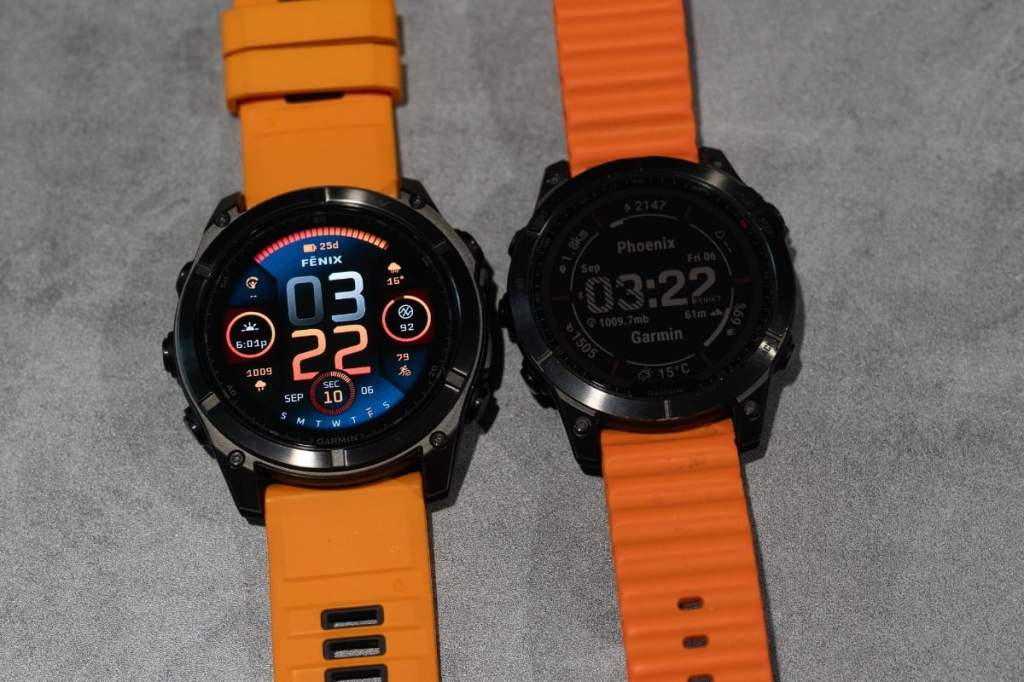
In the introduction I mentioned wanting to move from MIP to AMOLED. For those who don’t know the difference, MIP (Memory in pixels) doesn’t emit visible light while AMOLED is similar to what you have in your smartphone. MIP is like a colour version of the old LCD Casio watches that lasted forever, but required a light in the corner of the screen when it went dark. It works well outdoors but bad indoors, whilst AMOLED is harder to see outdoors, but great indoors.
Like most things, it’s about compromise, and Garmin tried to give consumers the option to pick their own, as both options are available in the Fenix 8 lineup.
MIP has a much longer battery life, over twice as long. The MIP version (which also benefits from solar charging) has a battery life of 30-48 days, depending on how much sun you have, while the AMOLED version 13 days (always on) and 29 days using gesture where the screen only comes on when you look at it. I’m currently using it in gesture mode.
Colours on the MIP version are only 64 colours, while the AMOLED has 64,000 colours. Aside from the colours, AMOLED has a much higher resolution with 454×454 vs 280×280. It’s three times the resolution on the AMOLED, with 230,400 over 78,400.
Here is MIP and AMOLED indoors with the MIP light on

Here is MIP and AMOLED indoors with the MIP light off
Setup
If this is your first Garmin, the setup process isn’t difficult. The watch prompts you with a QR code on the screen. It will either take you to the app in your phone app store, or open the app if you already have it installed. One app is mandatory (Garmin Connect) to connect and setup the device, a secondary Connect IQ is the Garmin App Store where you are able to source a large variety of apps, data sources and watch faces. If you plan on using it for Golf, you can install the Garmin Golf app on your phone.

I probably should have waited for the update to complete before I started the setup. Being a new release, the OS was flakey, with a substantial amount of lag. After subsequent updates, it’s been performing much better. I suspect it will still need another update or two, such is the nature of new releases.

For those upgrading from a previous generation Garmin, there is no automatic upgrade process, but it’s a relatively painless exercise to setup as it does still take most of the exercise and health history from your phone if you’ve previously setup a device. .
Features (some – not too detailed or I could be here for hours)
The Fenix 8 feature list is longer than some of my golfing buddies drives so I’m not going to list them all here. You can take a look at the Garmin website if you want to see them in more detailed version. Some highlights:
- 13 days (always on) or 29 days (gesture) of battery life
- Sapphire scratch proof AMOLED screen
- Microphone and speaker (the previous gen didn’t have the microphone)
- Recreational diving capability
- Built in LED flashlight with both white and red options
- Training Status, Recover time and a variety of workouts
- Lots of sensors and Apps
As I mentioned previously, I shifted to Garmin for battery life and I think it’s one area Garmin obliterates Apple. The battery life is 10 times longer than the Apple Watch Ultra 2 which is only 1.5 days. If you shift to gesture, it increases to nearly 20 times longer.
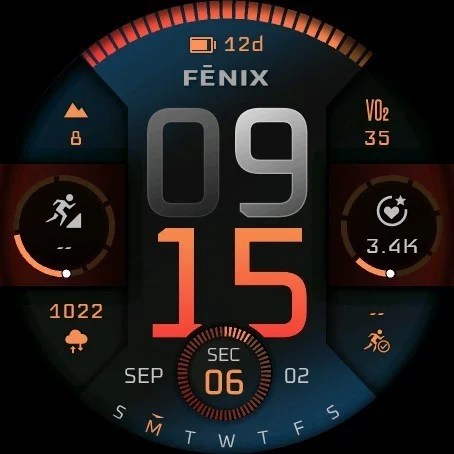
The AMOLED screen is gorgeous. I know a lot of people are happy with the MIP screen, but I’m not one of them. This is a copy of the screen at full resolution, so it’s easy to imagine how clear this is on a watch screen that is only 2 inches across.
I feel Garmin is more of a sports smartwatch, whereas Apple is just a smartwatch. As an example, it wasn’t uncommon for me to have my Apple Watch battery go flat during heavy or lengthy exercise sessions, which simply doesn’t happen with the Garmin.
For those who have never used Garmin, if you’re worried about your notifications, which I feel is the main reason most people rely on their smartwatch, you’ll have a complete set of notifications with the Garmin. It replicates all the notifications coming from your phone straight onto your watch.
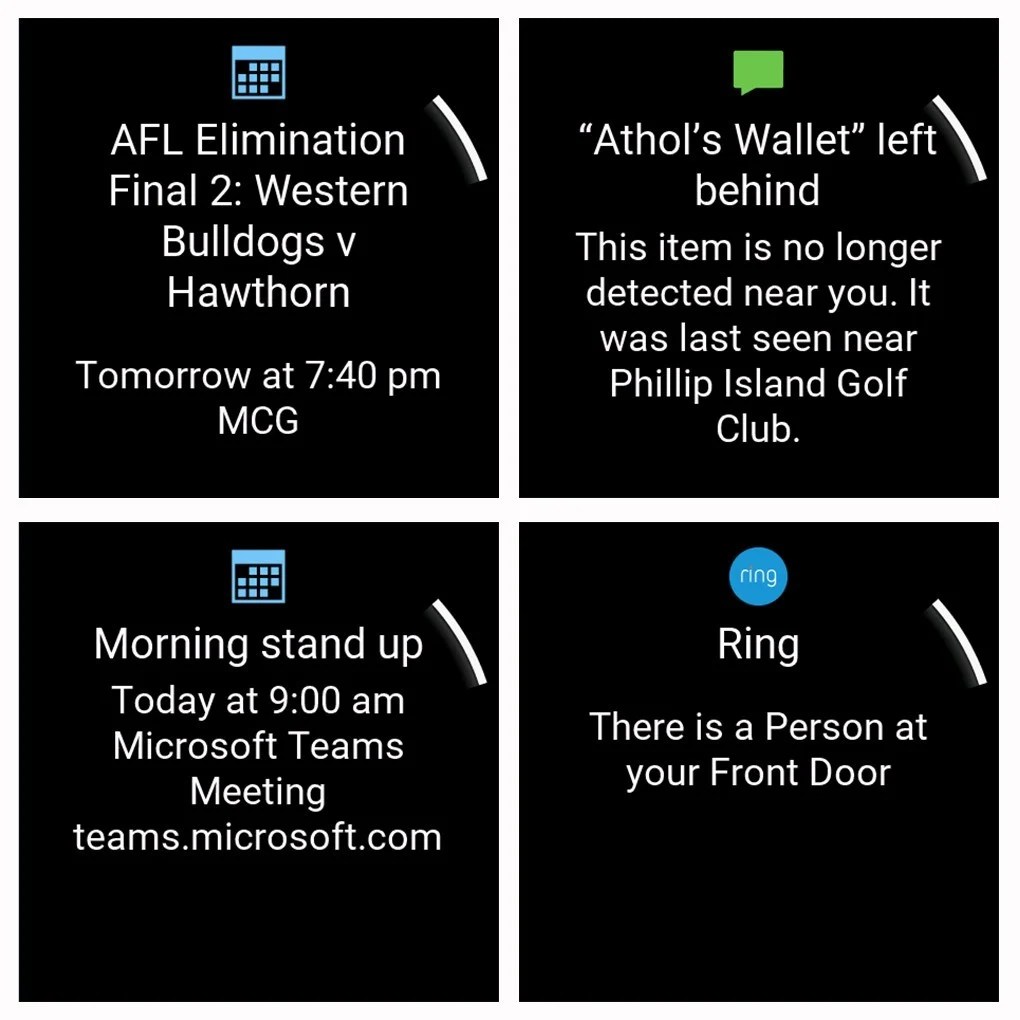
Where Apple betters the Garmin is in responses to notification. If you just read your notifications, the Garmin is fine. If you want to use the watch to reply to a message, Apple is better.
In line with focussing on sports/golf, there are plenty of training options embedded in the Garmin watch out of the box. As expected, these are focussed around traditional exercising like cycling and running. It would be great to see a training program specifically focussed around golf fitness, as nothing exists.
Garmin also includes a customisable morning report, giving you feedback on the upcoming day, including weather, your training levels and anything else that may be relevant.

Garmin Golf App
This is what we’re all here at the end of the day. Garmin Golf is preinstalled on the watch. It is where I believe Garmin excels, and not just the watch itself, but the Garmin Golf ecosystem as a whole.
Garmin Golf (which integrates with the Garmin Z series range finders, R series launch monitors and CT10 club identifiers). This allows you to setup up different clubs, get distances using the launch monitor and track real time distances on the course when you hit shots.
I don’t personally have the CT10 range (concerns about durability based on some of the reviews I’ve seen), and I have distances based on a Skytrak+, so I’m not using an R10 launch monitor either. I do use the Z30 as my range finder so I’ve got a partial ecosystem.
Getting a game started is really easy:
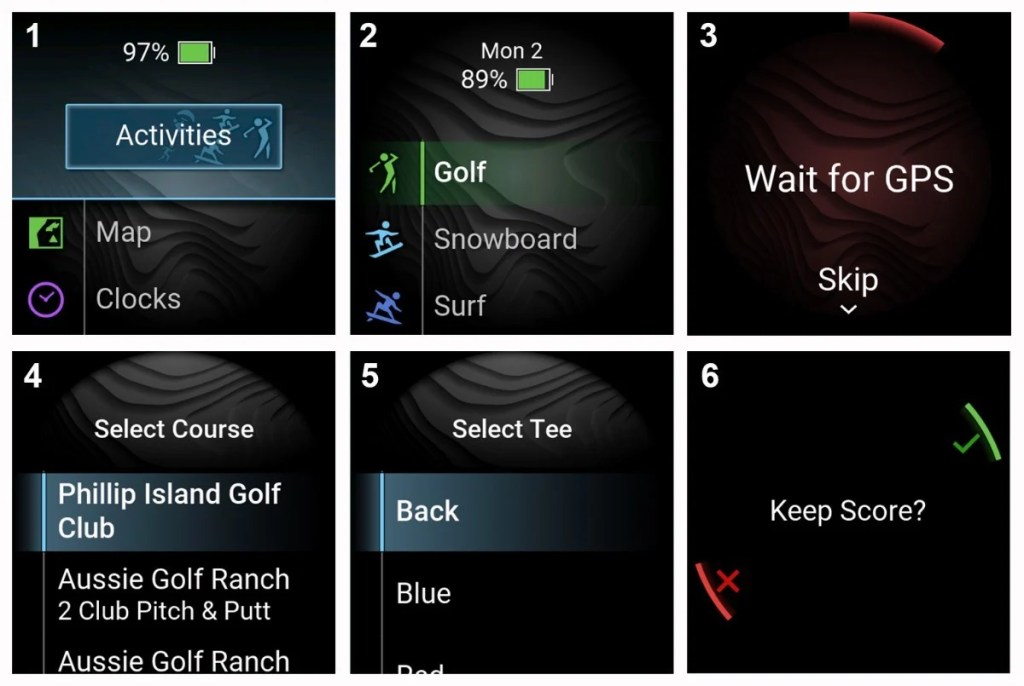
- Top right button to access activities
- Top right button for Golf is the first app at the top, so I just tap it again.
- It’ll search for a course nearby based on the GPS location
- If there is only one course, it will select the correct course, or it will present multiple options.
- It asks which tee you are off
- Finally, it’ll ask if you want it to track the number of strokes automatically, and you’re ready to go
That may seem like a few steps, but in reality, you’re clicking the same button a few times in a tow, so it’s not a lengthy or difficult process. 3 quick clicks will have the golf app activated and searching for the course.
Most of the time, the first view you get will be something like this off the tee. The white ring is an indicator of your driving distance (or selected club), while the blue, white and red bands shows 200/150/100 locations to give you an indication of how you could approach the hole. In this case, the large volume of trees and narrow fairways may promote rather taking an iron off the tee.

The man in white at the bottom of the screen is your caddy, so if he will indicate on distance to the green or pin if you’ve lasered it. In this case, I’ve tried to pick a location where it will show a caddy recommendation so I’m doing a measurement only 115 yards from the tee. His recommendation is that I hit my 3W. These recommendations will be based on your average shot distance if you have built up sufficient history to measure it, but you can manually insert distances to start.
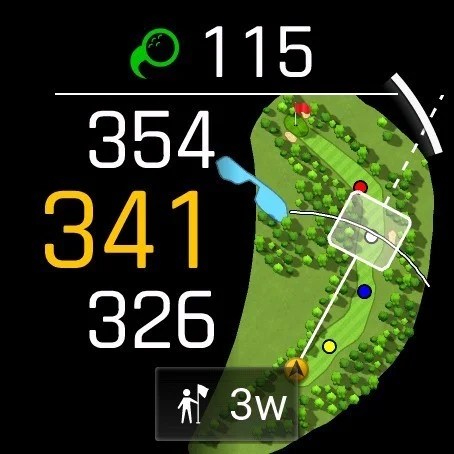
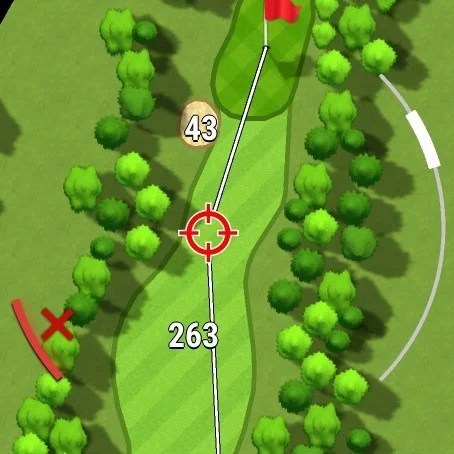
You have the ability to zoom in and try understand the distance to a different landing spot, to avoid a fairway bunker as an example. The white curve on the top right allows you to drag your finger up or down to zoom if you need a little more accuracy when placing the mark.
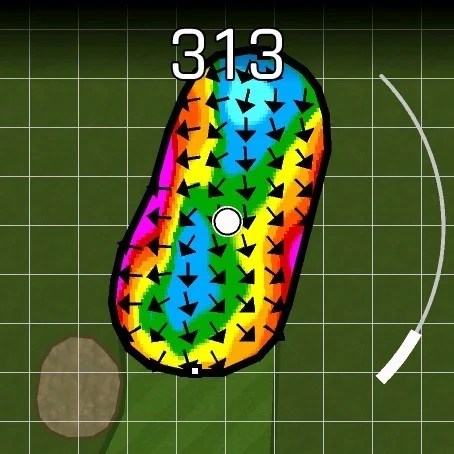
A menu option also allows you to access a green map that helps understand the slopes before you approach a green. While you may not like pin chasing, but knowing whether the best play is long or short is helpful. Strong downhill putts on fast stimp could be brutal, so erring on the low side of the hole is better. Again, the zoom curve appears although zoom is limited in competition mode.
Using the smartphone integration, it has a plays-like features, including wind speed, direction and density, and if you’re not sure what parts are legal for competition, it’ll automatically switch off the features that aren’t competition legal (Pin seeker and plays like) if you set it to competition mode. Here it shows slope, wind and air density

As a side note, Green Slopes capability (along with some of the other functionality) does require a subscription. I don’t think the slope percentages are professional level accurate but they’re good enough to help identify ridges and general slope steepness, and occasionally push in the right direction for those flat putts that could go either way. Here is a comparison between the free and paid versions.
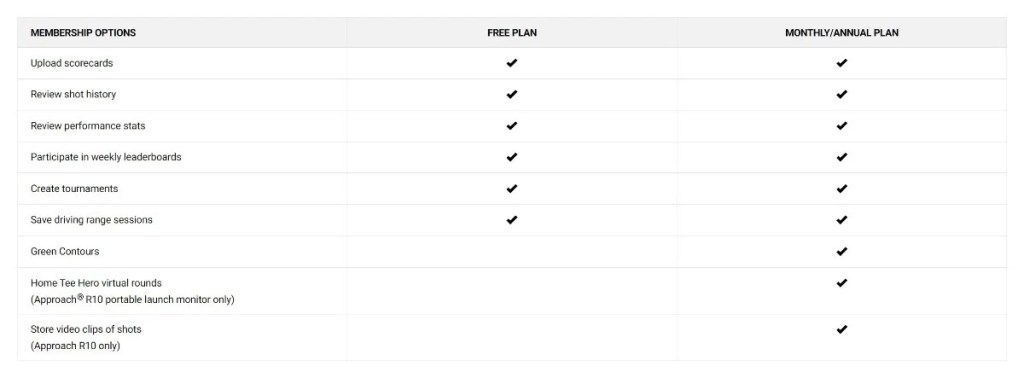
My personal view is if you purchased the Z30 or Garmin Fenix, the greens should be free. Most of the premium functionality is targeted at R10 owners:
Combined with other devices in the Garmin ecosystem like the Z30, functionality is extended to include pin location. It will show exactly where on the green the pin is located (with front and rear measurements) when your laser the pin. If you range a general obstacle like a tree, it will automatically zoom into the laser location on your watch screen. There is a lot more included with the Z30, so you can see the separate review I put together here.
The shot tracking is obviously good, but it can be a little unreliable. It’s not going to pick up all your putts or strokes and will occasionally ask you how many strokes you made. Sometimes, I’ll have a practice swing while waiting for someone, and it’ll register it as an additional stroke. For social rounds, it’s not a big deal and easy to fix. For comp rounds, I score in a proper comp tracker.
Negatives
Like most things, the Fenix 8 isn’t perfect.
First off, I’ll say that I should have updated it before trying to set it up. Rookie mistake with a new release. The software installed was pretty laggy/buggy but as soon as it updated, things improved drastically.
Next, no wireless charging? I appreciated that they couldn’t put USB-C on it because of the waterproofing levels required for diving, but no wireless seems a little 2020ish.
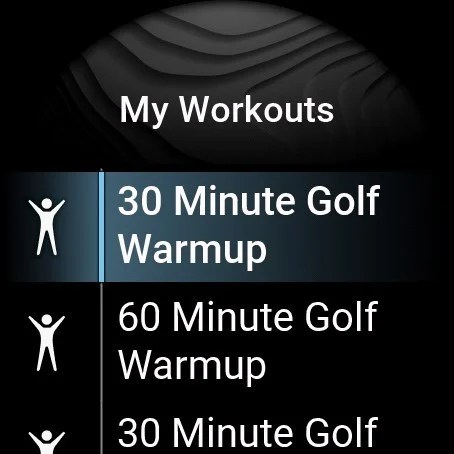
I think the workout area could be improved over current capability. It seems to be very running/cycling / gym focussed, down to the naming conventions used. Trying to add custom work outs can be challenging, because activities can’t be given custom names. It’s also not possible to add custom exercises.
Finally, the Garmin Fenix is a premium pricing range, but the strap pricing is a little ridiculous. $150 for a mediocre leather strap, $300 for a titanium link bracelet? These aren’t priced up because of high quality; it’s priced up because of the Garmin logo.
What other improvements would I like to see?
Garmin has invested a lot in the golf ecosystem, so I was surprised that there aren’t any decent training plans for golf. It’s great that you can play golf and see important things like distances to pins, but how about helping you score by improving your warm-up routine at the course or helping you increase your distance or flexibility?
They have these available for other sports, and it seems like a big miss not to include these for golf.
The kinds of things they could cover include:
- Pre-game warm up and stretching routines
- Range warm-up
- Golf Strength training workouts
- Golf flexibility training workouts
I have created some of my own, but it would be nice if these were provided standard.
Conclusion
Overall, there isn’t a lot you can fault the Garmin Fenix, it’s a really impressive system. As far as a golf ecosystem goes, Garmin is becoming one of the leaders in this space, and whilst I think there are some small gaps around pre-game warmups, there aren’t many gaps in the golf offering as a whole.
By comparison to the Apple Ultra Watch 2, I think it’s a much better product. It has 10 times the battery life, or 20 in the gesture mode I use, removing the need to charge every night., or even every week. I can go away for 2 weeks and not even bring my charger.
The issues I noted are small. Some will say the price is excessive but it’s not unreasonable given the construction and quality.
If you’re looking for a premium watch and have the budget, I’d highly recommend it.


 My Golf Review

Leave a comment