Introduction
Put my thoughts together on the Garmin after a couple of weeks of use.
12 months ago, I bought a Skytrak Plus with high hopes of using it on a weekly basis. That never materialised.
The reality was that I wanted a GC Quad, and I needed something like a GC Quad, but I couldn’t justify spending that much to hit balls in a net at my golf club. We don’t have a range, and I like to hit balls in the nets at the club when I have gaps in the day to help improve my swing. The problem with hitting into a net is sometimes you’re pulling the ball, or fading it, so you just don’t know what the ball is doing. You can feel it come off the toe or the heel, but you don’t always know the starting line of the ball.
I started with an R10, but the setup on our course makes it hard to use a rangefinder that goes behind due to limited space and people having to walk between the SIM and your mat. I thought the Skytrak Plus may become a poor mans GC Quad, but it didn’t work. The hassle of carrying two devices with my bag and clubs, setting up, connecting my iPad to the SKYTRAK wifi, waiting for the app to connect etc, meant that it became too difficult. There were other small annoyances, like connecting to the Skytrak wifi meant no internet so it didn’t automatically sync to my account. I then had to sync at home separately. Again, not an issue for a SIM connected to home wifi. I also tried it on grass and the little red dot was hard to see in the sun. And so, what started off as weekly use dwindled to an expensive device not getting used. It wasn’t the Skytrak’s fault. I bought the wrong device for my needs. The Skytrak is a great indoor SIM permanently set up, but I needed something like a GC quad that I could also take onto the course
When the R50 was announced, it was the answer I was looking for.
- Screen
- Side view (not behind the ball)
- Instant startup
- Portable
- Waterproof (to some degree)
- Broader ball location area for grass
- Club data including descent angle
Unboxing, packaging and construction
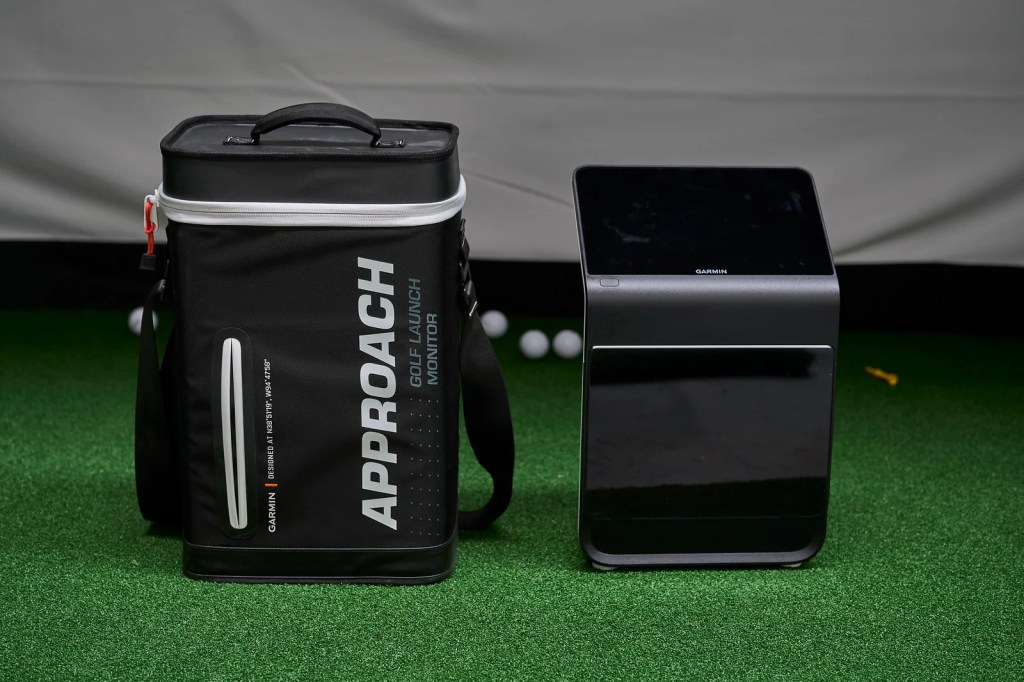
I’d heard the unit was large and the box is sizeable. Every reviewer has made that point, so the size of the unit and box wasn’t a surprise.
Open the box and you’ll find the unit in case, manuals, power cables, manuals and the usual assortment of cards that have found there way into modern gadgets thanks to idiots, like don’t stick your tongue in the plug point, use it for underwater hockey or skydiving.
The bag was a big surprise for me. Granted it’s an expensive piece of equipment, but it’s a really high quality bag. Well protected, waterproof zips, etc. I feel like I could throw it in the back of my golf cart and not have to worry about any risk of damage to the equipment.

The quality of the unit itself is also really high. Lightweight, but feels robust and solid. The sliding port at the back to protect the ports is a nice touch if you want to go outdoors and are worried about the elements.
The screen quality is amazing. It’s not 4K, but it’s a 1280×800 resolution screen that seems much better quality than the resolution screen indicates. The screen is crisp, clear and easy to read, even in bright sunlight. I’ve taken it out on a 82° F (28° C) and the screen was clear and easy to read.
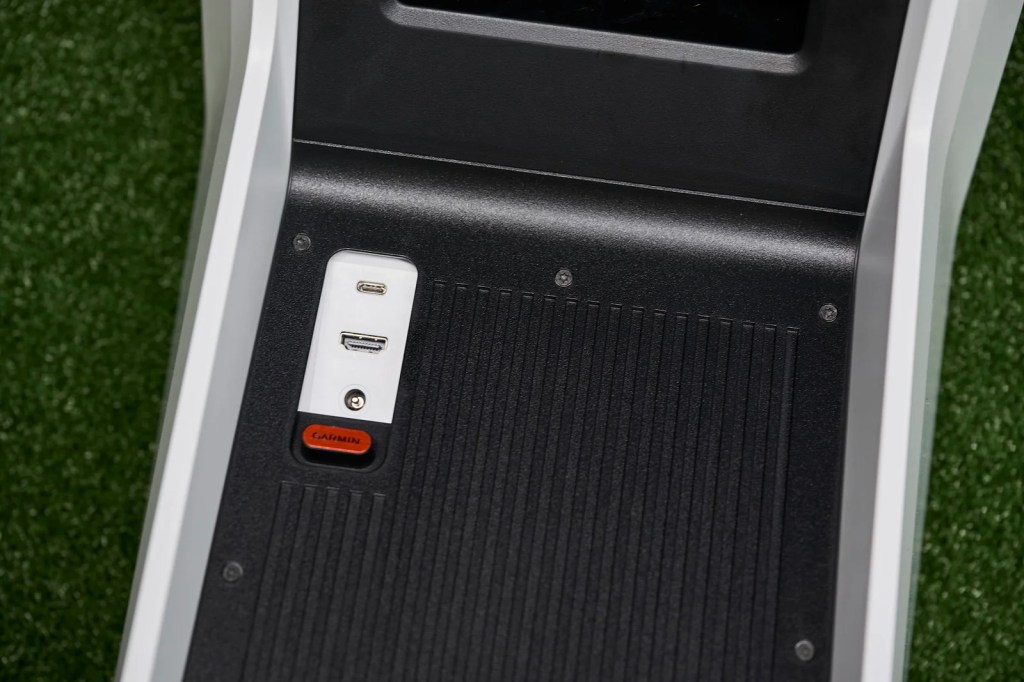
Setup
Setup is simple, particularly if you have a Garmin account already. It’ll prompt you for location (Timezone), wifi and account details before logging you in and allowing you to register the device.
It prompts you for setup information including your units of measure (metric or imperial) and allows you to have different units across the range. As an example, in Australia, we use metric for distance but club head speed is still measured in mph.
Temperature and humidity settings are typically prompted during practice or games so these aren’t required as part of the setup. You can automatically set the to your geographical location.
It checks for updates during the initial setup. Mine did an update almost immediately. Expect the charge the unit before use. My unit came with about 30% charge so I put the unit on to charge for the afternoon.
Usability and features
Before I get into the main area of the review, I’m going to warn people that I have not tested the unit with any third party apps. I don’t plan to use a separate PC so this unit fell perfectly into that area for me.
When you turn on the Garmin, it’ll offer you 3 options:
- Practice
- Home Tee Hero
- E6 Integration
Once you select your preference, you’ll find yourself with a lot of customisation options.
This video I created shows some basic navigation of the unit
Practice Range

Firstly, there is a practice option. You can select a variety (3)
of ranges, varying from open driving ranges to driving ranges with island greens. You select a club and you’re good to go. It’s an easy process to follow if you want some practice, similar in nature to the Garmin R10 app.
Once you enter practice mode, you’ll find yourself with a variety of screen customisation options at your disposal. On the main screen of the unit, it can be split into 3 parts. The first is a shot history which can only be switched on or off.
The next two can be customised to show a top map, a video of the club face hitting the ball, and a selection of data of which you can change to meet your requirements. The level of customisation is pretty amazing. The top view allows you to select your target on the range but the distances for targets on the range are predefined. I would be nice if you could adjust distance to the pin on the range facility. I found it could be annoying if pins are between clubs or not in line with the target you want.
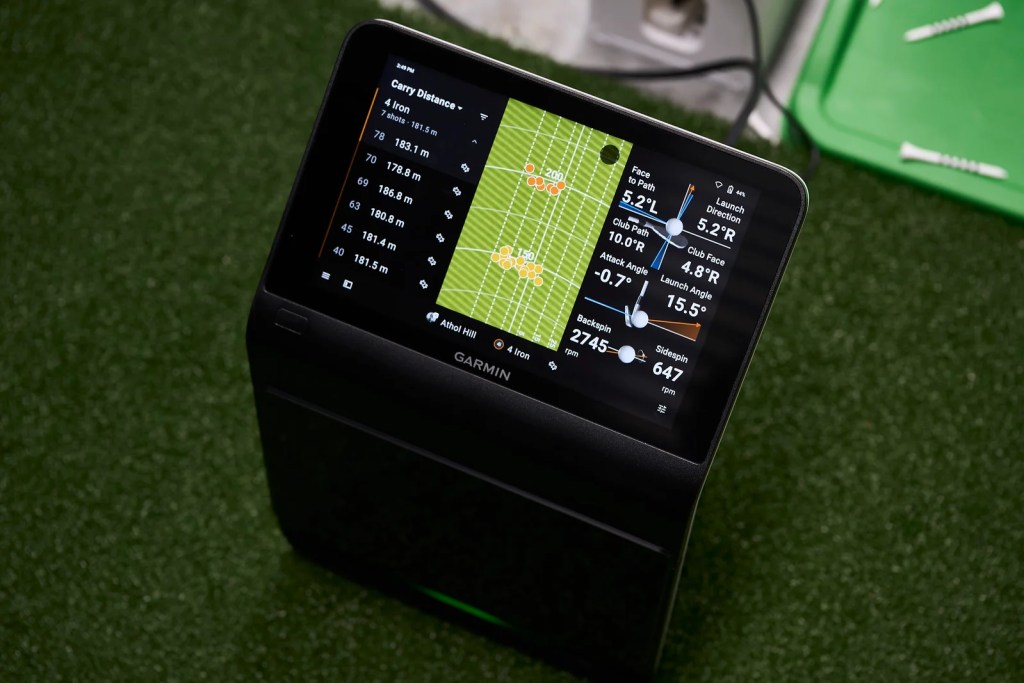
Groupings are great, and it groups by club. It lacks the functionality of comparing different sets as some simulators offer. As an example, if you wanted to compare two sets of balls or shafts, you can’t create separate groupings for the same iron and compare them on screen. You could theoretically mark one as a different iron like a six iron vs seven iron and then you could see them on screen, but it’s a manipulation, not native functionality.
It also lacks game improvement options found on models like the Skytrak. The R50 range functionality is just a basic driving range tool with different visualisations.
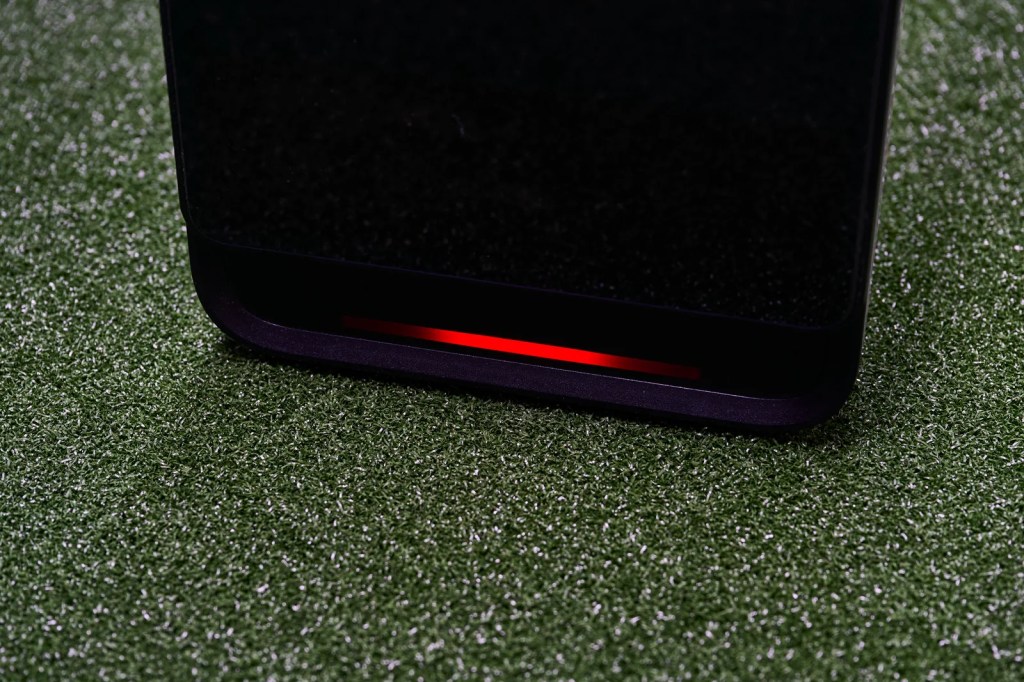
Getting the ball in the right location is fairly easy. The Garmin prompts you on the screen if the ball isn’t in the right location, and a colour LED on the bottom tells you whether you are okay to hit. Green means yes obviously.
This video shows moving a ball into position. Excuse the shaky nature of the video, I was moving the ball with my foot
Golf course play

The Garmin unit comes with something called “Home Tee Hero” which is based on the courses you’ll find on the Garmin watch or phone app. You’ll need to subscribe to Garmin’s $ 10/month subscription to get access to it. It‘s better quality than the phone app that you use with your watch, but the subscription are interchangeable across them, so if you subscribe to the watch, your subscription works on the R50.
The one big benefit with Home Tee Hero is the selection of courses…42,000 of them apparently. The course play is good and lots of fun. Having that many courses at your disposal ensures you’ll never be bored with the lack of variety.
The graphics aren’t as good as some of the better simulators on the market, a little cartoon like but it’s perfectly adequate for day-to-day use if you looking to practice. Better quality graphics would’ve meant better quality processor and video card required, along with a more hefty pricetag and I’m glad they kept this at a more affordable level, if you can call the R50 affordable. You have the option of plugging in a PC and using a third party app for better graphics.
The courses available are not very accurate other than the overacting shape of the hole and green. It will show trees on the left right where there are trees on your course, but they won’t show the actual tree configuration.
On our course as an example, if you hit your driver too far left on the first hole, you can be on the fairway but blocked out from the green requiring a low shot over the bunker, which is tough to stop on the green. In this case, their problem doesn’t occur so it’s not a realistic example of the outcome for our course. It also doesn’t have some of the slope information. Our second hole has a big hump at around 250 yards of carry up hill. If you don’t clear the ridge, your ball stops with a yard or two and you’re stuck with a 160 yard shot into the green. If you clear it, you have a 100 yard shot to the green. On home tee hero it’s all flat. That said it, if you know the course, you know you have to be middle or right side of the fairway so you could easily practice that.
There were a couple of features I thought we were missing from the course play:
The first one I was surprised wasn’t included, so I see it as a gap. With the current configuration, if you want to test the 17th hole (which on our course is an uphill par 3), you would have to play the course, pick up 16 times which takes about 10 seconds a time, then play that hole. The next problem is that if you want to play the same shot a few times, you have a small gap, maybe 5 seconds, to pick a mulligan, and if you miss it, you have to go back and start again. In its current form, it just isn’t usable in that way.
Currently there is also only stroke play. I think it needs some additional playing options like stableford and scramble, closest to the pin (in the range area or here)
Outdoor use
A lot of people will be buying this as an indoor SlM. I was probably unique in that I wanted something for outdoor use as well.
The unit itself is lightweight and easy to carry, it is larger than a GC Quad, but I don’t see issues with the mobility personally. The quality of the screen is really good in the sun. The quality of the unit itself is also good, and the sliding port at me back to protect the ports is a nice touch when you’re dealing with the elements.
I know some people have said it’s too large to be mobile. Maybe, maybe not. I don’t think I’d walk a golf course with this, but I’d happily take it in the cart. I probably wouldn’t walk a course with a GC Quad either.
Like any unit, you’re going to have issues with ball placement if you’re taking divots. The space if you are using club data is probably smaller than I would have liked. The Garmin is intuitive in the sense that it allows you to see where the ball is relative to where it should be, so it’s not hard to get it in the right spot. That said, if you’re at a grass range you may annoy people because of the narrow width if you’re using club data. It’ll either involve a lot of moving or wide duvet patterns.
As far as my hitting in the nets at our course, it didn’t quite work as well as I planned. The problem wasn’t the device, the problem was the terrible state of the nets and the mats. We have warm up nets on a concrete slab. It turns out the mats were in such a poor state it was hard to get accurate direction readings. They were essentially curved with hitting area on an upslope, causing the ball to come off slightly left. You’ll notice the next section about indoor use because I ended up building an indoor SIM.
I’m was a little unconvinced about on the accuracy of the unit outdoors. I didn’t have anything to compare it against, but it was underreading by about 15 yards. because, I was getting the right data indoors. This was during my initial tests in the nets. In my case, the accuracy could relate to sun location. In the Garmin manual, they indicate: “Minimize the amount of direct sunlight hitting the front of the launch monitor. If the sun is low on the horizon and the launch monitor is facing it, it can cause misreads.”. The sun direction when I have been out, would have been a little camera on. Subsequent tests with the sun not facing the unit have yielded better results.
The indoor SIM hasn’t changed my outdoor use though. They called it “Indoor Swing Syndrome’’. I find I don’t get full swings with the driver, and I’m typically about 20 yards shorter indoors vs outdoors. It might change over time and it’s not the unit, more of a psychological constraint of taking full swings with a driver indoors. I still like to head out on the course to test my driver, and fortunately we have a course that is quiet and allows for it. I’ll take the driver on my golf cart, hit 10 balls off the tee with the Garmin R50. Fetch the balls, then head to the next tee, do another 10.
The one thing that makes this possible is that the Garmin works like an iPad. It takes a minute to switch on, but once it’s there, you can switch off the screen and move to the next hole, and it doesn’t need to restart again. The screen comes on instantly and you have the option to continue your session.
Indoor Sim use
Okay, at the beginning I said I wanted to use it outdoors. Initially it was only outdoor use and then I decided to bite the bullet and hire some warehouse space as a man cave for indoor use. The timing was good, my wife had a small art studio and she needed to move to a new space as her contract was expiring. We opted for something bigger that could fit both of us. It was a good outcome, and allowed me to unclutter the house and get some of my camera lighting gear into a new location.
The main reason for the indoor use, related to the sorry state of our nets. I was getting some dodgy direction readings, due to the poor quality of our mats.
This is my new SIM setup, not exactly glamorous but perfect for what need. It’s better than our current net setup.

As a sim unit, it’s amazing. I’m glad I went to the effort of building this.
Switching between left handed and right handed.
Switching between left and right handed is surprising easy. You pick up the unit, move to the other side. Voila – done. I play with a lefty so it’s great to be able to switch.
Feature requests
Obviously this is the holy grail of launch monitor features, but club impact location would be a nice touch. It has the camera, so you can see what your impact location is, but having the ability to translate that into a location would be incredible.
The size of the ball zone is a little small when you use the club data (with sticker). It isn’t terrible, a narrow zone about 3 inches by 8 inches, where not using club data is about three times larger. If they could double this size, particular for outdoor use, it would make the unit a little easier to work with.
Bugs
It’s a new unit so bugs aren’t surprising. I picked up one major bug during the testing. The range view on the external screen would occasionally switch to a top down view and I couldn’t get it out of this. Worse yet, it wouldn’t even show the shots on the top down view. I could get it to switch back by toggling the setting to mirror the R50 screen, but it was a minor annoyance. I’m sure it will be fixed soon.
Conclusion
A lot of the reviews for the R50 have been really positive. It’s not surprising, it’s an amazing piece of hardware. It’s the first unit I’ve seen that brings the functionality (almost) of a GC Quad to a more affordable unit with the added benefit of things like a colour screen, and no requirement for an external PC for game play. It’s an example of how technology is becoming more accessible to non-professional golfers. Some people may still see this as expensive, but if you wipe out the cost of a PC, and add the benefit of being able to take this to the range or course, it’s actually really good value for money.
It’s not perfect, there are a few gaps. None of them are show stoppers from my perspective. They’re also software upgradable so if Garmin adds them, you won’t have to upgrade your hardware to benefit. This is one of the major upsides. It’s already a really good unit and Garmin have the ability to make it even more amazing.
It’s not going to match the realism of some of the premium simulators but you have the option to connect to a PC and get these features so it’s still available. For a lot of people, that isn’t important. Personally, I don’t care about realism. I just want something I can play, and use for practice.
Accuracy has some question marks for me, particularly outdoors where the sun may have an influence.
Overall, this gets a big thumbs up for me.


 My Golf Review
Leave a comment